
Face Matching and Duplicate Profile Detection for Player Registration
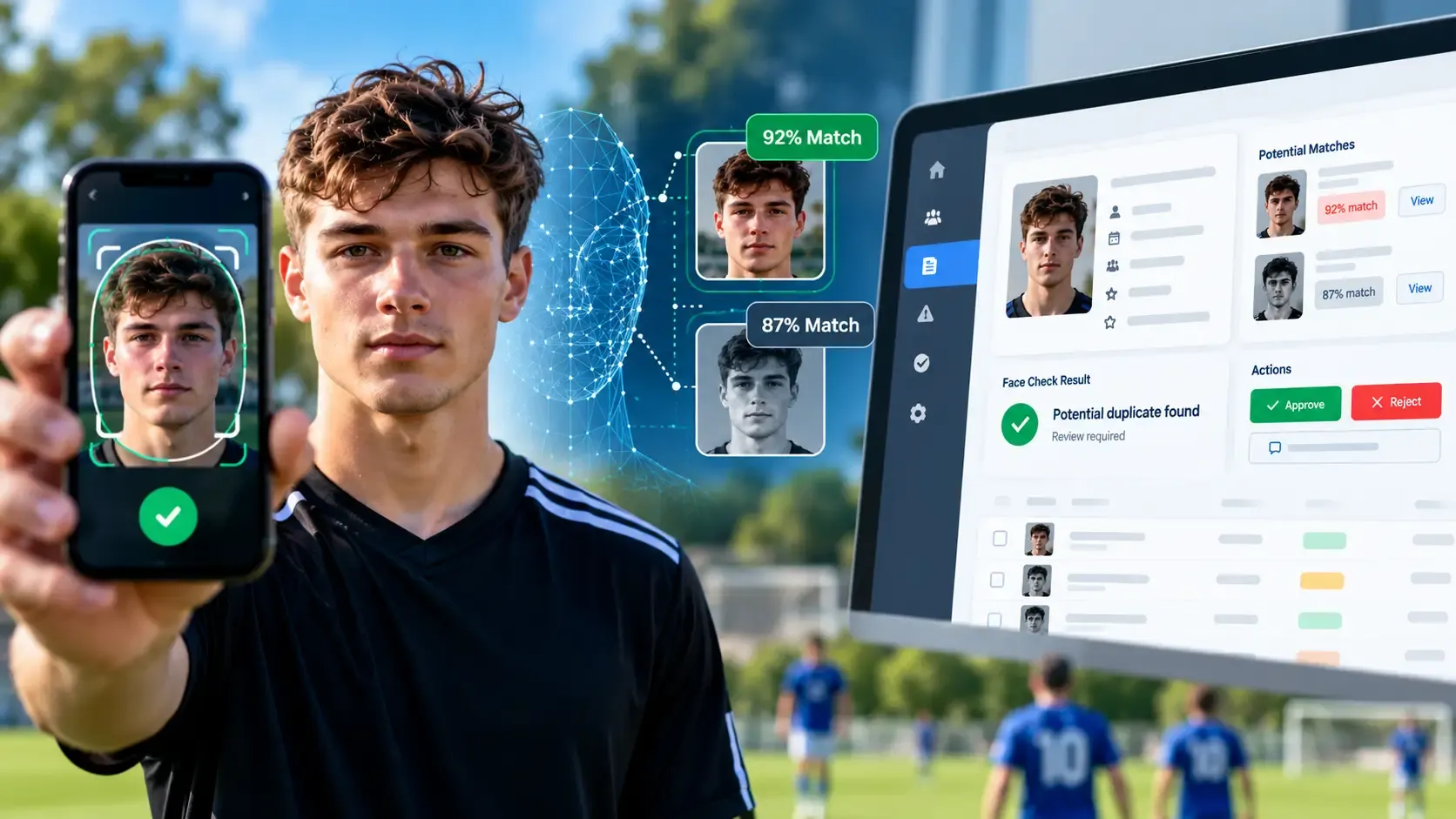
Sports organisations often inherit years of player records. As online registration grows, the same person may accidentally—or intentionally—create another account rather than reconnecting with an existing player profile.
Yuma Technology designed a player onboarding and face-matching workflow for a sports membership platform to help administrators identify potential duplicate profiles while keeping the final decision in human hands.
The solution combines guided mobile photo capture, automated face analysis, duplicate-profile matching and an administrator review workflow.
The challenge
The registration system needed to support two very different journeys:
New players needed a straightforward way to create a profile and submit it for administrator review.
Existing players needed to be able to claim a historical profile without accidentally creating a duplicate record.
A traditional form alone could not reliably identify situations where the same person registered twice using different contact details.
At the same time, any automated matching system had to avoid making irreversible decisions on its own.
The objective was therefore not to automatically reject users, but to give administrators better evidence when reviewing registrations.
Guided profile-photo capture
One of the first challenges was obtaining a usable profile photograph.
Mobile users can easily submit photos where:
- the face is too small;
- the head is turned sideways;
- multiple people are visible;
- the face is poorly centred;
- the image is unsuitable for reliable comparison.
Yuma Technology implemented an on-device guided camera experience using MediaPipe.
The mobile capture interface provides a visual face guide and checks factors such as:
- one visible face;
- face position;
- face size;
- head yaw;
- head pitch;
- head roll;
- visibility of both eyes;
- stability before capture.
Users receive immediate instructions such as:
Center your face
Look straight
Hold still
Ready
The live camera analysis remains in the browser. The final photograph only enters the normal application upload flow after the user chooses to capture and save it.
Cross-device mobile camera engineering
Building guided camera capture across Android devices introduced an additional engineering challenge.
Different mobile browsers can expose camera frames using different dimensions and presentation behaviour. In testing, one Android device returned a landscape camera stream while displaying it inside a portrait interface.
Rather than weakening the face-position rules to accommodate individual devices, Yuma Technology developed a canonical analysis process.
The browser:
- freezes the current camera frame;
- checks the complete frame for additional faces;
- calculates the exact visible crop shown to the user;
- renders that crop into an internal analysis canvas;
- performs face-landmark analysis against the same visual area represented by the on-screen guide.
This created a consistent coordinate system across different camera and browser behaviours.
The full camera frame is still checked separately, helping prevent a second person outside the visible crop from being ignored.
Duplicate face matching
After a valid profile photograph is uploaded, the server processes the image asynchronously.
The face-processing pipeline:
- detects a usable face;
- produces a numerical face representation;
- compares it with existing enrolled player profiles;
- calculates similarity;
- creates a potential duplicate review when the configured threshold is reached.
Face processing runs separately from the main website request, allowing player registration to remain responsive.
Human review instead of automatic rejection
An important design requirement was that face matching should assist administrators rather than replace them.
A potential match does not automatically:
- reject an application;
- merge player accounts;
- delete records;
- approve a claim.
Instead, the administrator receives a review case containing the relevant player information and potential match.
The administrator can then decide whether the result represents a genuine duplicate.
This human-in-the-loop approach reduces the risk of automated false-positive decisions.
Player-controlled onboarding
The onboarding workflow also separates profile completion from administrator submission.
Players can complete their information without immediately creating work for administrators.
A new player completes required information such as:
- player type;
- date of birth;
- profile picture;
- requested playing category.
Only after the required information is complete can the player explicitly select:
Submit for Admin Review
This creates a clear boundary between an unfinished account and an application that is genuinely ready for administrator attention.
Requested category vs official category
New players can also indicate which playing category they believe best reflects their level.
The system deliberately keeps this separate from the official category.
For example:
Player requested category: D
Official category: D-
The player can express their expectation, while the administrator retains authority over the final classification.
Existing-profile claims continue to use the category associated with the claimed historical profile.
Administrator review centre
Yuma Technology created a central review interface where authorised administrators can review submitted player applications.
The interface brings together:
- profile photograph;
- player details;
- claimed profile information;
- requested category;
- official category;
- face-check outcome;
- possible duplicate matches;
- approval actions.
Profile photographs can also be enlarged for detailed inspection without exposing the underlying image through a new public URL.
Privacy-conscious architecture
The solution was designed to minimise unnecessary movement and exposure of sensitive information.
Key architectural decisions include:
- live face-guidance calculations performed on-device;
- no transmission of live camera frames for guidance;
- no storage of facial landmarks from the guided camera;
- private server-side photo handling;
- authenticated face-processing service;
- locally provisioned model assets;
- asynchronous processing;
- administrator-controlled duplicate decisions.
The system is designed as an aid to the wider approval process rather than an autonomous identity decision engine.
Technical architecture
The platform combines technologies including:
- Laravel;
- JavaScript;
- MediaPipe Face Landmarker;
- OpenCV / YuNet;
- server-side face embeddings;
- asynchronous Laravel queues;
- MySQL;
- responsive mobile camera interfaces;
- administrator approval workflows.
The browser handles photo-quality guidance, while the private server-side processing layer handles duplicate comparison.
This division keeps the interactive mobile experience responsive while retaining central control over matching and review.
Outcome
The resulting workflow gives the organisation a more structured registration process:
- players receive immediate guidance when taking profile photographs;
- incomplete accounts stay out of the administrator's active review queue;
- new players explicitly submit completed applications;
- existing players can claim historical profiles;
- potential duplicate registrations can be surfaced automatically;
- administrators remain responsible for final decisions;
- player-requested classifications remain separate from official classifications.
The result is a more controlled onboarding process without turning automated face matching into an automatic approval or rejection mechanism.
Building similar systems
Yuma Technology develops custom registration, membership and workflow applications for organisations that need more than a standard form-based system.
Potential applications include:
- sports associations;
- membership organisations;
- accreditation platforms;
- event registration;
- staff and contractor onboarding;
- duplicate-account detection;
- profile verification workflows;
- legacy database migration and account claiming.
If your organisation needs to connect modern registration workflows with existing member records, Yuma Technology can design the onboarding, matching and administrator-review process around your operational requirements.
Frequently Asked Questions
What is face matching software?
Face matching software compares a face detected in one photograph with stored face representations to identify potential similarities. In this solution, matches are presented to an administrator for review rather than being used for automatic rejection.
Can face matching detect duplicate accounts?
Face matching can help identify potential duplicate profiles even where account details such as email addresses differ. It should normally be combined with other profile information and human review.
Can face detection run directly on a mobile phone?
Yes. Browser technologies such as MediaPipe can perform face detection and landmark analysis on the user's device, allowing real-time guidance without continuously sending camera frames to a server.
What is the difference between face detection and face matching?
Face detection identifies whether a face is present and where it appears in an image. Face matching compares representations of two detected faces to estimate their similarity.
Can automated face matching reject a user?
It technically can be used in automated workflows, but the BBFUK implementation was deliberately designed around administrator review. Potential matches create a review case rather than automatically rejecting or merging an account.